
Privy Authentication
Overview
Stable Coin Inc (SBC) has developed a demo integration with Privy, a leading platform for user authentication and identity management in Web3. This integration simplifies the onboarding process for users, allowing them to interact with SBC-powered applications using familiar authentication methods like email, social logins, or phone numbers, while still benefiting from blockchain security and gasless transactions.
Benefits of Privy Integration
- User-Friendly Onboarding: Removes the barrier of managing private keys or seed phrases by offering authentication through everyday methods (email, Google, Twitter, etc.).
- Seamless Wallet Creation: Automatically creates both embedded wallets and smart accounts for users upon authentication.
- Gasless Experience: Combines Privy's smart wallets with SBC's paymaster for a fully gasless user experience.
- Enhanced Security: Leverages Privy's secure identity management alongside smart account features.
- Dual Wallet Support: Users get both an embedded wallet for regular transactions and a smart wallet for gasless transactions.
How It Works
- Authentication: Users log in via Privy using their preferred method (e.g., email or social account).
- Wallet Provisioning: Privy automatically creates:
- An embedded wallet for regular transactions
- A smart wallet configured with SBC's paymaster for gasless transactions
- SBC Integration: The smart wallet is automatically configured to use SBC's paymaster, enabling gasless transactions with SBC tokens.
- User Interaction: Users can now interact with SBC-powered dApps without needing to manage gas fees or complex wallet setups.
Technical Implementation
SBC's Privy integration is showcased in the privy-demo project, which includes:
- Next.js Application: A demo application built with Next.js, demonstrating Privy authentication flows.
- Smart Wallet Integration: Integration with Privy's smart wallets using SBC's paymaster.
- UI Components: User interface elements for login, balance display, and gasless transactions.
📖 Full Example: View complete source code on GitHub
Privy Dashboard Setup
1. Get your Paymaster & Bundler Configuration URLs ready
Be sure to replace YOUR_SBC_API_KEY from an API Key from the SBC Dashboard
Bundler URL: https://api.aa.stablecoin.xyz/rpc/v1/baseSepolia/YOUR_SBC_API_KEY
Paymaster URL: https://api.aa.stablecoin.xyz/rpc/v1/baseSepolia/YOUR_SBC_API_KEY
2. Go to your Privy Dashboard
Under Wallet Infrastructure, click on Smart wallets, then + Add new chain
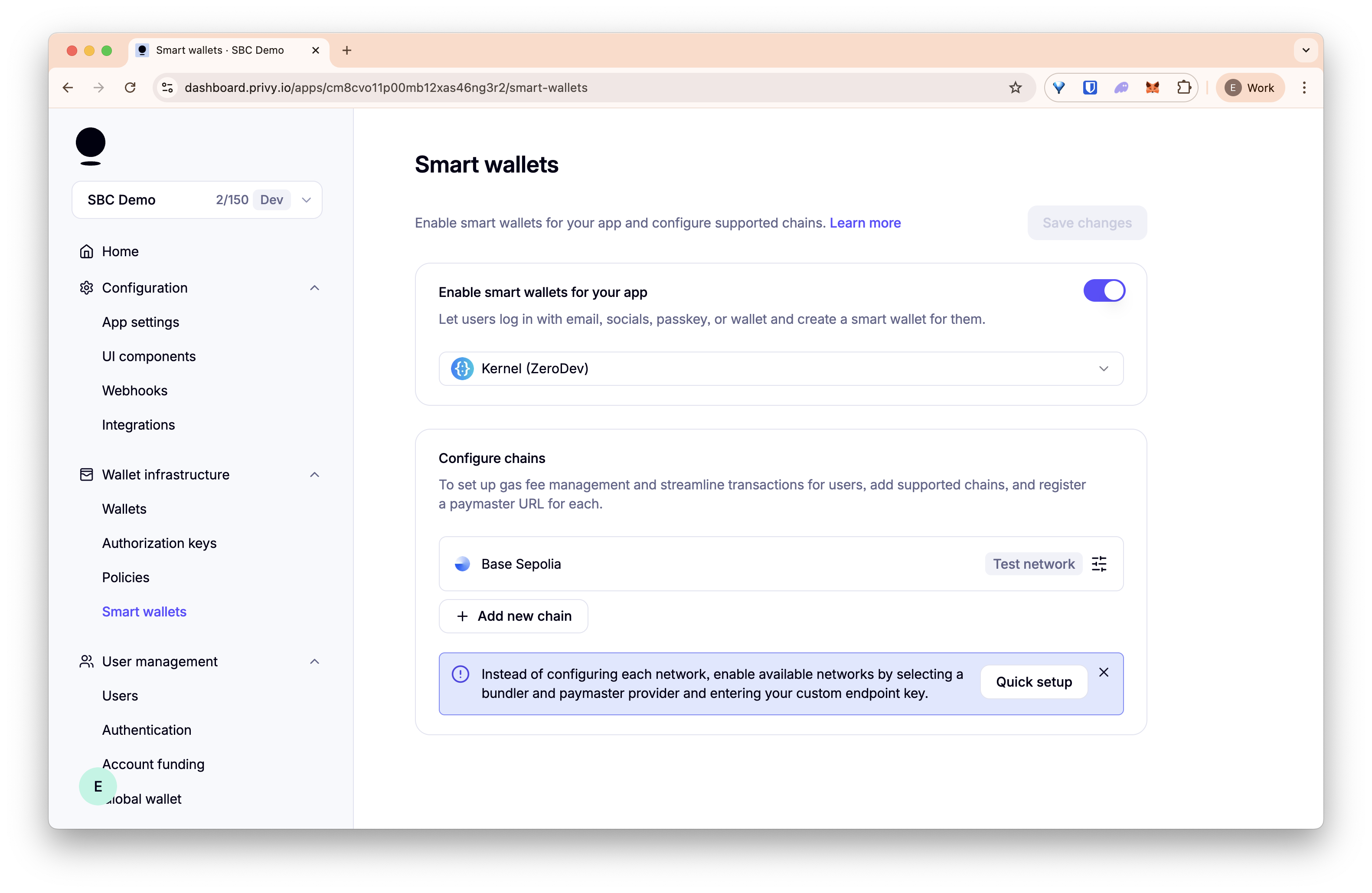
3. Configure your chain
Select Base Sepolia and input the Bundler URL and Paymaster URL from step 1. Then click Save and close.
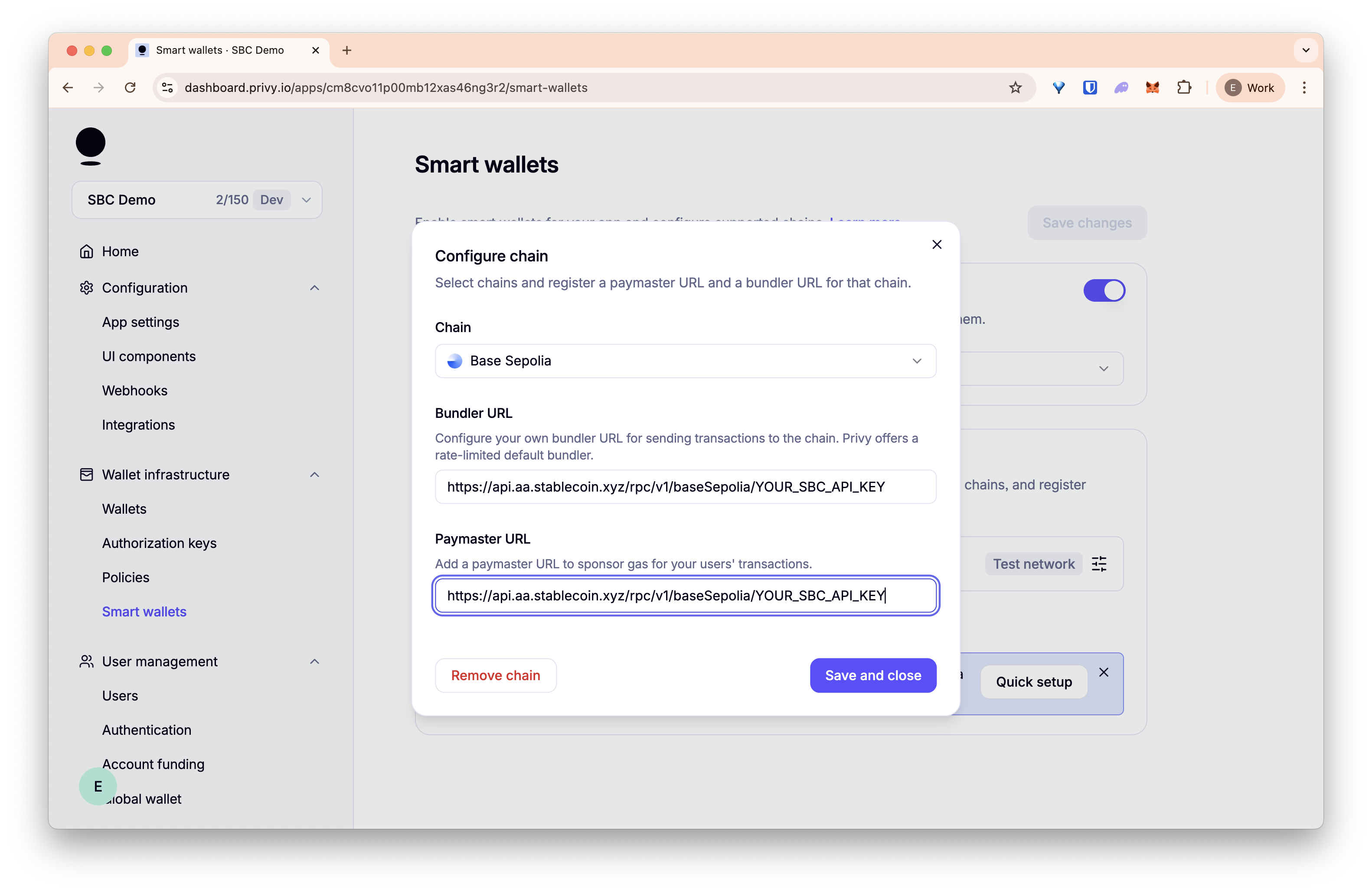
Your Privy app is now set up to use SBC's Paymaster on Base Sepolia!
Integration Example
Here's a simplified example of setting up Privy with SBC's paymaster:
// app/providers.tsx
'use client';
import { PrivyProvider } from '@privy-io/react-auth';
import { SmartWalletsProvider } from '@privy-io/react-auth/smart-wallets';
import { WagmiProvider, createConfig } from '@privy-io/wagmi';
import { baseSepolia } from 'viem/chains';
import { http } from 'wagmi';
import { QueryClient, QueryClientProvider } from '@tanstack/react-query';
const queryClient = new QueryClient();
export default function Providers({ children }: { children: React.ReactNode }) {
return (
<PrivyProvider
appId={process.env.NEXT_PUBLIC_PRIVY_APP_ID || ''}
config={{
embeddedWallets: {
ethereum: {
createOnLogin: 'all-users',
},
},
defaultChain: baseSepolia,
supportedChains: [baseSepolia],
}}
>
<SmartWalletsProvider
config={{
paymasterContext: {
mode: 'SPONSORED',
calculateGasLimits: true,
expiryDuration: 3600,
sponsorshipInfo: {
webhookData: {},
smartAccountInfo: {
name: 'SBC Gasless',
version: '1.0.0',
description: 'SBC',
icon: 'https://swap.stablecoin.xyz/nav-sbc-logo.svg',
website: 'https://stablecoin.xyz',
email: 'support@stablecoin.xyz',
twitter: 'https://twitter.com/stablecoin_xyz',
}
}
}
}}
>
<QueryClientProvider client={queryClient}>
<WagmiProvider
config={createConfig({
chains: [baseSepolia],
transports: { [baseSepolia.id]: http() },
})}
>
{children}
</WagmiProvider>
</QueryClientProvider>
</SmartWalletsProvider>
</PrivyProvider>
);
}Utility Functions
First, create the utility functions needed for the demo:
// src/utils/erc20.ts
export const ERC20_ABI = [
{
constant: true,
inputs: [{ name: 'owner', type: 'address' }],
name: 'balanceOf',
outputs: [{ name: 'balance', type: 'uint256' }],
type: 'function',
},
{
constant: true,
inputs: [],
name: 'decimals',
outputs: [{ name: '', type: 'uint8' }],
type: 'function',
},
];// src/utils/format.ts
import { formatUnits } from 'viem';
import { SBC_DECIMALS } from '../constants';
export function formatSbc(balance: bigint | number | string): string {
return Number(formatUnits(BigInt(balance), SBC_DECIMALS)).toFixed(3);
}Using Smart Wallets for Gasless Transactions
// components/GaslessTransferButton.tsx
import React, { useState } from 'react';
import { encodeFunctionData } from 'viem';
import { useSmartWallets } from '@privy-io/react-auth/smart-wallets';
import { SBC_TOKEN_ADDRESS, SBC_DECIMALS, DEMO_AMOUNT } from '../constants';
function isValidAddress(address: string): address is `0x${string}` {
return /^0x[a-fA-F0-9]{40}$/.test(address);
}
export function GaslessTransferButton({
onTxSent,
setStatusMessage,
}: {
onTxSent?: (txHash: string) => void;
setStatusMessage: (msg: string) => void;
}) {
const { client: smartWalletClient } = useSmartWallets();
const [recipient, setRecipient] = useState<`0x${string}`|''>('');
const [error, setError] = useState<string | null>(null);
const [isSending, setIsSending] = useState(false);
const handleTransfer = async () => {
setError(null);
if (!isValidAddress(recipient)) {
setError('Please enter a valid Ethereum address.');
return;
}
if (!smartWalletClient) {
setStatusMessage('Smart wallet not ready.');
return;
}
setIsSending(true);
try {
const data = encodeFunctionData({
abi: [
{
name: 'transfer',
type: 'function',
stateMutability: 'nonpayable',
inputs: [
{ name: 'to', type: 'address' },
{ name: 'amount', type: 'uint256' },
],
outputs: [{ name: '', type: 'bool' }],
},
],
functionName: 'transfer',
args: [recipient, BigInt(Number(DEMO_AMOUNT) * 10 ** SBC_DECIMALS)],
});
const txHash = await smartWalletClient.sendTransaction({
to: SBC_TOKEN_ADDRESS,
data,
});
setStatusMessage(`Gasless transfer successful! Tx: ${txHash}`);
onTxSent?.(txHash);
setRecipient('');
} catch (error) {
console.error(error);
setStatusMessage('Transfer failed. Please try again.');
} finally {
setIsSending(false);
}
};
return (
<div>
<label className="block mb-2 text-sm font-medium text-gray-700" htmlFor="recipient-address">
Recipient Address
</label>
<input
id="recipient-address"
type="text"
value={recipient}
onChange={e => setRecipient(e.target.value as `0x${string}`)}
placeholder="0x..."
className="w-full mb-2 px-3 py-2 border border-gray-300 rounded focus:outline-none focus:ring-2 focus:ring-blue-400 font-mono text-sm bg-white text-gray-900"
autoComplete="off"
spellCheck={false}
maxLength={42}
/>
{error && <div className="mb-2 text-red-600 text-sm">{error}</div>}
<button
onClick={handleTransfer}
disabled={!smartWalletClient || isSending}
className="w-full mt-2 px-6 py-3 bg-green-600 text-white rounded-lg font-medium disabled:opacity-50 disabled:cursor-not-allowed hover:bg-green-700 transition-colors cursor-pointer"
>
<div className="text-center">
<div>Send Gasless Transfer ({DEMO_AMOUNT} SBC)</div>
{recipient && isValidAddress(recipient) && (
<div className="font-mono text-sm mt-1">{recipient.slice(0, 8)}...{recipient.slice(-6)}</div>
)}
</div>
</button>
</div>
);
}Main App Component
// app/page.tsx
'use client';
import { usePrivy } from '@privy-io/react-auth';
import { useEffect, useState } from 'react';
import { createPublicClient, http } from 'viem';
import { baseSepolia } from 'viem/chains';
import { useWallets } from '@privy-io/react-auth';
import { GaslessTransferButton } from '../components/GaslessTransferButton';
import { ERC20_ABI } from '../utils/erc20';
import { formatSbc } from '../utils/format';
import { SBC_TOKEN_ADDRESS } from '../constants';
export default function Home() {
const { ready, login, authenticated, logout, user } = usePrivy();
const { wallets } = useWallets();
const [embeddedBalance, setEmbeddedBalance] = useState<string | null>(null);
const [smartWalletBalance, setSmartWalletBalance] = useState<string | null>(null);
const [statusMessage, setStatusMessage] = useState<string | null>(null);
const [txHistory, setTxHistory] = useState<string[]>([]);
// Get wallets with fallback detection
const embeddedWallet = wallets.find(w => w.connectorType === 'embedded');
const smartWalletFromWallets = wallets.find(w => w.connectorType === 'smart_wallet');
const smartWalletFromUser = user?.linkedAccounts?.find(account => account.type === 'smart_wallet');
const smartWallet = smartWalletFromWallets || smartWalletFromUser;
// Fetch token balances
useEffect(() => {
const fetchBalances = async () => {
if (!authenticated) return;
const publicClient = createPublicClient({
chain: baseSepolia,
transport: http(),
});
try {
// Embedded wallet balance
if (embeddedWallet?.address) {
const balance = await publicClient.readContract({
address: SBC_TOKEN_ADDRESS,
abi: ERC20_ABI,
functionName: 'balanceOf',
args: [embeddedWallet.address],
});
setEmbeddedBalance(formatSbc(balance as bigint));
}
// Smart wallet balance
if (smartWallet?.address) {
const smartBalance = await publicClient.readContract({
address: SBC_TOKEN_ADDRESS,
abi: ERC20_ABI,
functionName: 'balanceOf',
args: [smartWallet.address],
});
setSmartWalletBalance(formatSbc(smartBalance as bigint));
}
} catch (error) {
console.error('Failed to fetch balances:', error);
setStatusMessage('Failed to fetch wallet balances');
}
};
fetchBalances();
}, [authenticated, embeddedWallet?.address, smartWallet?.address]);
// Clear status message after 5 seconds
useEffect(() => {
if (statusMessage) {
const timeout = setTimeout(() => setStatusMessage(null), 5000);
return () => clearTimeout(timeout);
}
}, [statusMessage]);
const addTxToHistory = (txHash: string) => {
setTxHistory(prev => [txHash, ...prev]);
};
if (!ready) {
return (
<div className="min-h-screen flex items-center justify-center bg-gray-50">
<div className="text-center">
<div className="animate-spin rounded-full h-12 w-12 border-b-2 border-gray-900 mx-auto"></div>
<p className="mt-4 text-gray-900">Loading...</p>
</div>
</div>
);
}
if (!authenticated) {
return (
<div className="min-h-screen bg-gray-50 py-12 px-4 text-gray-900">
<div className="max-w-2xl mx-auto text-center">
<div className="bg-white p-8 rounded-lg shadow">
<h2 className="text-xl mb-4 text-gray-900">Connect Your Wallet</h2>
<p className="text-gray-600 mb-6">Connect with Privy to start using gasless transactions</p>
<button
onClick={login}
className="px-8 py-3 bg-blue-600 text-white rounded-lg font-medium hover:bg-blue-700 transition-colors cursor-pointer"
>
Connect with Privy
</button>
</div>
</div>
</div>
);
}
return (
<div className="min-h-screen bg-gray-50 py-12 px-4 text-gray-900">
<div className="max-w-2xl mx-auto">
<h1 className="text-3xl font-bold text-center mb-8 text-gray-900">Privy + SBC Paymaster Demo</h1>
{statusMessage && (
<div className="mb-6 p-4 bg-blue-50 border border-blue-200 rounded-lg text-blue-800 text-center">
{statusMessage}
</div>
)}
<div className="space-y-6">
{/* Wallet Information */}
<div className="bg-white p-6 rounded-lg shadow">
<h2 className="text-xl font-semibold mb-4 text-gray-900">Wallet Information</h2>
{/* Embedded Wallet */}
<div className="mb-4 p-4 bg-green-50 rounded-lg border border-green-200">
<div className="flex items-center justify-between mb-2">
<p className="text-sm font-medium text-green-800">Embedded Wallet</p>
<span className="text-xs bg-green-100 text-green-700 px-2 py-1 rounded">Regular Transactions</span>
</div>
{embeddedWallet?.address ? (
<>
<p className="font-mono text-sm text-gray-800 mb-1">{embeddedWallet.address}</p>
<p className="text-lg font-bold text-green-600">
Balance: {embeddedBalance !== null ? `${embeddedBalance} SBC` : 'Loading...'}
</p>
</>
) : (
<p className="text-gray-500 italic">Not connected</p>
)}
</div>
{/* Smart Wallet */}
<div className="p-4 bg-blue-50 rounded-lg border border-blue-200">
<div className="flex items-center justify-between mb-2">
<p className="text-sm font-medium text-blue-800">Smart Wallet</p>
<span className="text-xs bg-blue-100 text-blue-700 px-2 py-1 rounded">Gasless Transactions</span>
</div>
{smartWallet?.address ? (
<>
<p className="font-mono text-sm text-gray-800 mb-1">{smartWallet.address}</p>
<p className="text-lg font-bold text-blue-600">
Balance: {smartWalletBalance !== null ? `${smartWalletBalance} SBC` : 'Loading...'}
</p>
</>
) : (
<p className="text-gray-500 italic">Creating smart wallet...</p>
)}
</div>
</div>
{/* Gasless Transfer */}
<div className="bg-white p-6 rounded-lg shadow">
<h2 className="text-xl font-semibold mb-4 text-gray-900">Gasless Transfer</h2>
<p className="text-gray-600 mb-4">
Send SBC tokens without paying gas fees using SBC's paymaster.
</p>
<GaslessTransferButton
onTxSent={addTxToHistory}
setStatusMessage={setStatusMessage}
/>
</div>
{/* Transaction History */}
{txHistory.length > 0 && (
<div className="bg-white p-6 rounded-lg shadow">
<h2 className="text-xl font-semibold mb-4 text-gray-900">Transaction History</h2>
<div className="space-y-2">
{txHistory.map((tx, index) => (
<div key={tx} className="flex items-center justify-between p-3 bg-gray-50 rounded">
<a
href={`https://sepolia.basescan.org/tx/${tx}`}
target="_blank"
rel="noopener noreferrer"
className="font-mono text-sm text-blue-600 hover:underline truncate flex-1 mr-4 cursor-pointer"
>
{tx}
</a>
{index === 0 && (
<span className="text-xs text-green-600 bg-green-100 px-2 py-1 rounded">
Latest
</span>
)}
</div>
))}
</div>
</div>
)}
<div className="text-center">
<button
onClick={logout}
className="px-6 py-2 bg-gray-600 text-white rounded-lg hover:bg-gray-700 transition-colors"
>
Disconnect Wallet
</button>
</div>
</div>
</div>
</div>
);
}Environment Setup
Create a .env.local file:
# .env.local
NEXT_PUBLIC_PRIVY_APP_ID=your_privy_app_id_hereDependencies
Make sure to install the required dependencies:
npm install @privy-io/react-auth @privy-io/react-auth/smart-wallets @privy-io/wagmi @tanstack/react-query viem wagmi@privy-io/react-auth- Core Privy authentication@privy-io/react-auth/smart-wallets- Smart wallet functionality@privy-io/wagmi- Wagmi integration for Privy@tanstack/react-query- Query client for data fetchingviem- Ethereum librarywagmi- React hooks for Ethereum
Key Features Demonstrated
- Dual Wallet System: Users get both embedded and smart wallets
- Automatic Smart Wallet Creation: Smart wallets are created automatically on login
- SBC Paymaster Integration: Smart wallets use SBC's paymaster for gasless transactions
- Balance Tracking: Real-time balance updates for both wallet types with fallback detection
- Transaction History: Track completed gasless transactions with explorer links
- Error Handling: Comprehensive error handling, address validation, and user feedback
- Smart Wallet Detection: Robust fallback logic for detecting smart wallets from multiple sources
- Status Management: Auto-clearing status messages and loading states
Use Cases
- dApp Onboarding: Simplify user entry into your decentralized application with familiar login methods.
- Enterprise Solutions: Enable corporate users to interact with blockchain services without technical knowledge of wallets.
- Gaming Platforms: Lower the entry barrier for gamers unfamiliar with crypto, allowing seamless in-game transactions.
- DeFi Applications: Provide gasless trading and yield farming experiences.
Next Steps
- Check out the complete demo on GitHub for the full implementation
- Reach out on Telegram for Privy integration support or to access testnet SBC tokens
- Visit the SBC Dashboard to get your API key and start building
- Get Base Sepolia SBC tokens from the SBC Faucet for testing